Manage Student Fees
Manage Student Fees
Fee Operations Center
This is the central module for managing a student's financial profile. It acts as a unified dashboard where you perform three critical tasks: **Applying the Fee Structure**, **Collecting Manual Payments**, and **Granting Concessions**. Instead of visiting different pages, you manage the entire fee lifecycle here.
1 The Three Core Functions
When you select a student in this module, you get access to these three primary actions in the menu.
1. Apply Fee
First Step: Link the student to a Fee Structure (e.g., "B.Tech Sem 1"). This generates the "Due Amount" in their ledger.
2. Pay Fee Manually
Collection: Record offline payments made via Cash, Cheque, or DD directly into the system.
3. Manage Concession
Discount: Grant scholarships or waivers (e.g., "Merit Discount") to reduce the payable amount.
2 Deep Dive: Granting Concessions
How to apply a discount using the "Manage Concession" screen.
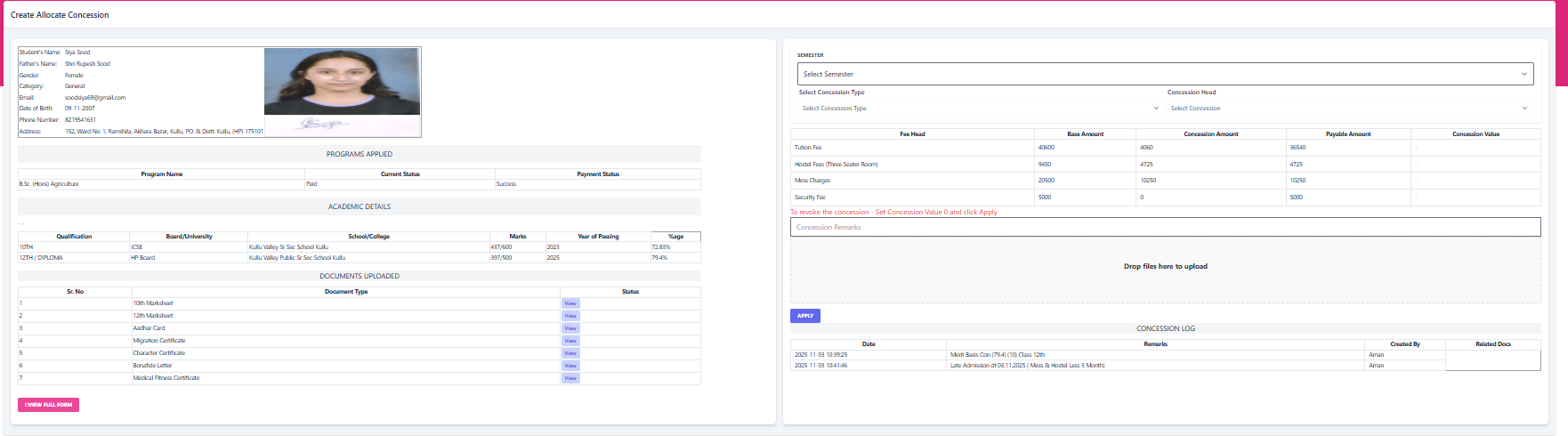
Step A: Eligibility Check
The screen displays academic details (10th/12th marks) to help you verify if the student qualifies for a merit-based scholarship.
Eligible for >75% Merit Scheme
Step B: Configure Discount
3 Ledger Impact (Calculation)
Once applied, the system automatically calculates the new payable amount.
| Fee Head | Base Amount | Concession | Payable |
|---|---|---|---|
| Tuition Fee | ₹ 40,600 |
- ₹ 4,060
|
₹ 36,540 |