Rejected
Rejected Applications
This module maintains a record of all student applications that have been **Rejected** by the administration. Applications may be rejected due to duplicate entries, ineligibility, missing documents, or non-payment. This list serves as an archive but also allows for re-evaluation if needed.
1 Rejected Students List
A filtered view showing only students with the status "Form Rejected".
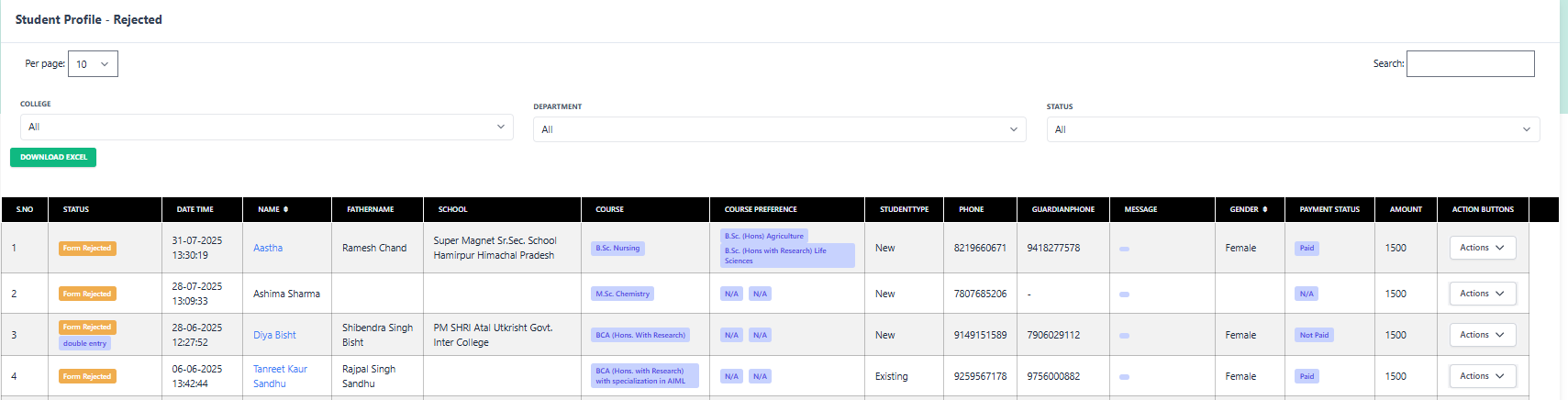
Filters & Sorting
- Status: Automatically filtered to 'Form Rejected'.
- Search: Locate specific rejected applications by Name or Phone.
- Date Range: Find rejections within a specific admission cycle.
List Highlights
2 Common Reasons for Rejection
Double Entry
Student registered twice with different emails or phone numbers. One entry is kept, the other rejected.
Ineligibility
Student does not meet the academic criteria (e.g., low percentage in 12th grade) for the selected course.
Invalid Documents
Uploaded documents were blurry, incorrect, or fake upon verification.
3 Available Actions (Recovery)
Even if a form is rejected, you still have options. You can view their details, check payment history, or even Re-Accept the form if the rejection was a mistake.
1. Status
View the timeline: When was it submitted? When was it rejected and by whom?
2. Accept Form
Mistake? Click this to move the student back to the "Form Accepted" list.
3. Follow-up
Call the student to explain the rejection reason or ask for missing details.
4. View Form
Review the data submitted by the student.